 MiniMe
Download
Meet the tiny you that keeps you well.
MiniMe turns one photo into a pixel version of you that lives on your Mac. It drinks water when you should, stretches when you've sat too long and pops up before meetings. Look after it by looking after yourself.
Free · Apple silicon and Intel · macOS 14 or later


- Free to download and use
- No account and no ads
- Private: your apps never leave your Mac
- Light: under 1% CPU
You swipe notifications away. It's harder to ignore yourself.

From download to desk buddy in a minute
No account, no settings to hunt for. MiniMe walks you through everything the first time you open it.
-
Download
Free for Mac. Drag MiniMe into Applications and open it.
-
Say hi
Tell it your name, pick what to be reminded about, and switch on meeting alerts if you like.
-
It moves in
Your mini settles into the bottom-right corner and starts looking after you. Everything else lives in the menu bar.
One photo in. A tiny you out.
Upload a selfie and MiniMe draws you in pixel art, with dozens of poses and moods: typing, sipping water, dozing at your desk, powering up when you're on a roll.
Kart, below, is the first MiniMe. He's made from a photo of Kartik, who built the app.


Anyone can have one.
Make a mini of yourself, your partner, your kids, your grandparents. Even the dog.
And it can be anything you like.
Superhero on Monday, wizard by Friday. Dress your mini up for the mood you're in.
Look after it by looking after yourself.
Every reminder you act on powers your mini up: Charged, then Super, then Ultra. Ignore them and it gets visibly tired. It's surprisingly hard to let a tiny you down.
Go on, give Kart a better day.
I've had a long day…

- Drained
- Low
- Normal
- Charged
- Super
- Ultra
A day with MiniMe
It sits in the corner, copies what you're doing, and only speaks up when it matters.

Good morning
Pops in to say hi and settles into its corner.

Water break
Sips from a bottle until you do too. Click it when you're done.

Meeting in 5
Reads your Calendar. One click joins the call.

Quiet on calls
Camera on? It steps out of view and holds every reminder.

Deep work
Types along while you code, reads while you browse.
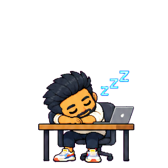
Bedtime
Falls asleep at its desk. A gentle hint.
Your Mac stays yours
- Your apps stay private
- MiniMe notices which app is in front, whether a call is on and whether you're away, on your Mac. App names and window titles never leave it.
- Your photo isn't kept
- It's used once to draw your mini, then deleted.
- No account, no tracking
- Download it and open it. That's the whole setup. This website has no analytics either.
- Light on your Mac
- Under 1% CPU while it sits in the corner.
Questions
Is it really free?
Yes. MiniMe is free to download and use. There's no trial, no subscription and no ads.
Which Macs does it run on?
Any Mac running macOS 14 Sonoma or later, with Apple silicon or Intel.
Can I make a mini of myself today?
Yes. The first time you open MiniMe, add a photo of yourself and it draws your mini in about a minute and a half. Your photo is used once and then deleted.
Will it get in my way?
It sits in one corner, clicks pass through everything around it, and it steps away during calls. You can also keep it off screen until something actually needs you.
What can it remind me about?
Water, stretching, eye breaks, posture, standing up, breathing, snacks and calm minutes, each on its own timer, plus any reminders of your own. It can also warn you before meetings from your Mac's Calendar.
Who made it?
MiniMe is made by Skeontech. Kart is a pixel version of its founder, Kartik.
Bring your mini home
MiniMe is free for Mac. Download it, drag it into Applications and open it to meet your desktop companion.
Download MiniMe for MacFree · Apple silicon and Intel · macOS 14 or later